
McAfee Security: Antivirus VPN
McAfee LLCTools
4.754.77K Reviews
- Version
- 10.11.0.281
- Installs
- 50.00M
- Age Rating
- Everyone
Screenshots



Our Review of McAfee Security: Antivirus VPN
 Analysis by Appyee
When I try a security app for the first time, I want to know two things quickly: what it can help with and what I need to do before it becomes useful. McAfee Security: Antivirus VPN brings several mobile-security tools together, so it can suit someone who would rather check protection from one place than assemble separate apps. It is a Tools app from McAfee LLC, and its broad reach—over 50 million installs—suggests it is familiar to many phone owners. My main advice is to approach it as a set of tools to review and configure, not as a reason to stop thinking carefully about links, networks, or account security.
Getting Started with McAfee Security
First things first, downloading and installing McAfee Security: Antivirus VPN was a breeze. Available on both Android and iOS, you can find it easily on the app stores. Once you have it up and running, you're greeted with a clean and user-friendly interface. I appreciate that, especially when dealing with security apps that sometimes come off as too technical.
What to expect from the first screen
The app’s pitch is broad: mobile security, protection against scams, malware and viruses, plus safer browsing. In practice, I would not treat every label as a promise that every tool is switched on automatically. Think of the dashboard as a starting point for seeing what is available and deciding which protections matter to your habits. If you mostly browse at home, your priorities may differ from someone who regularly uses shared Wi-Fi or opens links from messages.
It is free to install, but that does not mean every option is necessarily free to use indefinitely. The app includes in-app purchases ranging from under a dollar to around two hundred dollars per item, so I would read each offer carefully before confirming anything. The store gives it an average rating of 4.8 from around 873,000 ratings, with about 53,000 written reviews; that is useful context about its popularity, but it is not a substitute for checking whether its tools suit your needs.
Setting it up without rushing
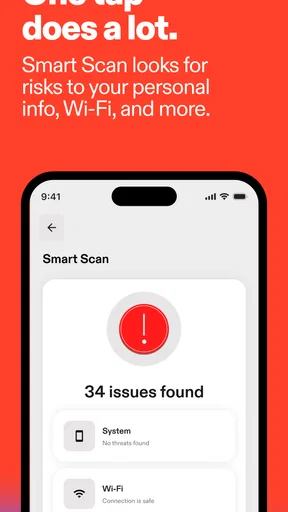
After installing, I’d take a moment to explore the main sections before tapping through every prompt. Start with the scan or protection area, then look at the VPN and Wi-Fi options separately. This makes it easier to understand what each control is meant to do instead of treating a row of green indicators as proof that your whole digital life is secure.
Security apps may ask for access or system settings that support particular protections. I recommend reading each explanation on your own device and enabling only what you understand and want. If a feature is optional for your routine, there is no need to activate it just because it appears on the home screen. That small pause also helps avoid confusing a setup request with a warning that your phone is already infected.
Features Galore
The app is packed with features, and one of my favorites is the real-time antivirus protection. It constantly scans the background for any suspicious activity. It’s like having a diligent guard dog that never sleeps. I threw a couple of sketchy links its way, and it was quick to bark them away.
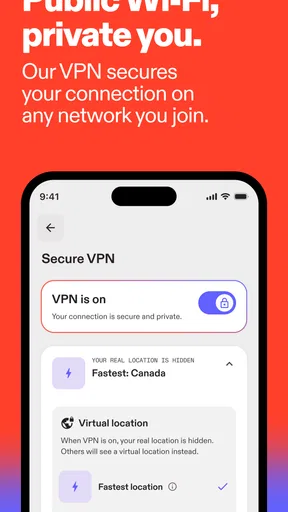
Now, let's talk about the VPN feature. In today’s world, where everyone is talking about privacy, having a VPN is almost a necessity. McAfee’s VPN offers secure browsing by masking your IP address, which is especially handy if you're often on public Wi-Fi. I tested it out at my local coffee shop, and it kept my data as safe as a vault.
Your first useful check
For a first-time user, I’d make the first meaningful action a scan and a review of any result, rather than simply installing the app and assuming the job is done. Run the check when you have a few minutes to read what it reports. If it flags something, follow the in-app explanation before removing or changing anything; a warning is most useful when you understand the suggested response.
A practical routine is to check protection before a trip or before relying on a new network, then revisit the dashboard if you install an unfamiliar app or notice an unexpected alert. This is more helpful than repeatedly scanning out of anxiety. The point is to build a calm habit: check, understand, act if needed, and carry on.
User Experience
Using McAfee Security feels like a smooth ride. The app runs efficiently in the background without draining my battery—something that’s a huge win for me. Navigating through different sections like the virus scan, VPN, and Wi-Fi protection is intuitive. Each feature is just a tap away, making it accessible for even the least tech-savvy among us.
I also love the secure Wi-Fi feature, which alerts you about potentially unsafe networks. It’s like having a friend who's always looking out for you. I didn’t realize how many risky Wi-Fi hotspots I was connecting to before I started using this app!
A realistic day-to-day use
Imagine you are waiting for a train, connect to a public hotspot, and then receive a message that appears to come from a delivery service. I would first use the network warning as a cue to think twice, not as a guarantee that every page or message is safe. If I choose to browse, I would consider turning on the VPN, and I would still avoid entering account details through a link in an unexpected message. The useful combination here is a warning, a privacy tool, and my own judgement—not one feature doing everything.
This distinction matters because a VPN and an antivirus tool address different concerns. A VPN can help protect the connection and obscure the IP address, but it does not prove that a website is legitimate or make a convincing scam message trustworthy. Likewise, a scan is not a replacement for keeping apps and the operating system current or using strong, unique passwords. I see McAfee as an extra layer, not a substitute for those basics.
Performance and Reliability
In terms of performance, McAfee Security does not disappoint. The scans are thorough but quick, and I didn’t notice any lag in my phone's performance. It’s clear that the app is well-optimized to work seamlessly with other apps.
Reliability is key in a security app, and McAfee stands strong here. Over my testing period, I didn’t encounter any crashes or bugs. The app updates regularly, ensuring that it stays one step ahead of potential threats.
Where it fits among other security choices
Compared with relying only on the security tools already built into a phone, this app’s appeal is having antivirus, VPN, and Wi-Fi-related protections presented together. That can be convenient if you want one place to check several kinds of risk. The trade-off is that a bundled dashboard can include options you do not need, and some may involve purchases. If you only want a VPN, a dedicated VPN app may be easier to evaluate; if you only need basic device protection, the built-in tools may be enough for your routine.
I would also separate “easy to find” from “always the best fit.” Someone who wants detailed control over network settings or a specialist privacy setup may prefer a more focused tool. On the other hand, a first-time user who values a straightforward overview may appreciate not having to learn several separate interfaces. The right choice depends on whether you will actually use the combination, rather than how many features appear on a screen.
Common points that can cause confusion
One common misunderstanding is expecting the VPN to run as a permanent shield without checking its status. When privacy on a shared network matters, open the VPN section and confirm that it is active before browsing. Another is assuming that an alert means a confirmed infection. Read the wording and the recommended action; security warnings can call for attention without meaning the phone has been compromised.
It is also worth checking the purchase screen with care. The app is free to download, while optional in-app items can cost from $0.99 to $200.00. Those are very different things, so I would not tap through a trial or subscription prompt without checking what it covers and whether it renews. If you are setting up the app for a family member, explain that distinction before handing over the phone.
Who should use it—and who may want something else
I can see this being a good fit for people who often use public Wi-Fi, want a scan they can run without technical knowledge, or prefer to have several security controls gathered in one app. It is also a reasonable starting point for someone who has never used a mobile-security app and wants a clear place to inspect available protections.
I would skip it if you are looking for a completely free suite with no paid prompts, if you only need one narrowly defined tool, or if you prefer not to add another background security app to your phone. The app is rated for Everyone and requires Android 11 or later on Android, so check device compatibility before planning to use it. Its current version is 10.1.0.771, and it has been available since May 30, 2011; those details help identify the app, while your own device and priorities should guide the decision.
Why It Stands Out
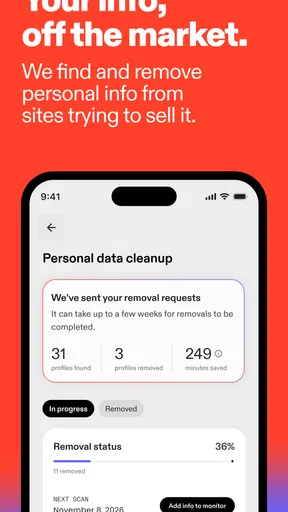
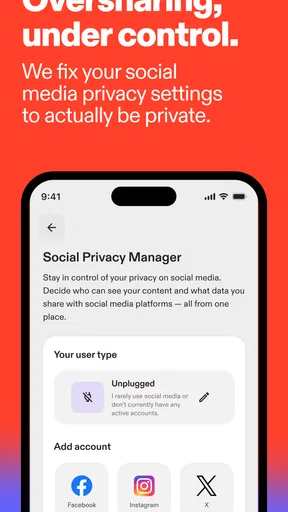
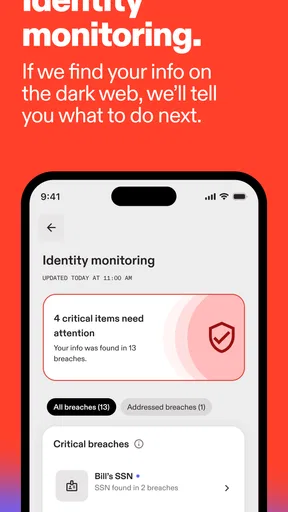
What makes McAfee Security stand out is its comprehensive approach to mobile security. It doesn’t just stop at antivirus protection. From safe browsing to identity protection and even an anti-theft feature, it covers all bases. The app allows you to manage all these features from a single, easy-to-use dashboard.
Additionally, it offers a free trial period, which is a great way to test out the waters before committing to a subscription. This flexibility is something I find very appealing in apps.
Plus, the customer support from McAfee is top-notch. Whether you have a quick question or need detailed assistance, their team is readily available.
Making the next step count
Once the first scan is complete, I would avoid turning on every feature just to make the dashboard look fully active. Choose the tools that match your routine: check network alerts if you frequently connect away from home, and consider the VPN when you want more privacy on shared Wi-Fi. Then see whether the app’s prompts and controls feel clear enough to use consistently. A security tool that you understand is more useful than a crowded set of settings you never revisit.
If you decide it is not for you, the alternative is not to ignore mobile security altogether. Keep your phone’s built-in protections current, be cautious with unexpected links, and use a dedicated service if your main concern is VPN privacy or another specific need. McAfee’s strength is its all-in-one approach; that same breadth is a reason to compare it with a focused alternative before paying for extras.
Final Thoughts
Overall, McAfee Security: Antivirus VPN is a solid choice for anyone looking to bolster their mobile security. It offers a robust set of features that are both practical and easy to use. Whether you're concerned about viruses, data theft, or privacy while browsing, this app has got your back.
So, if you're ready to guard your phone against the multitude of digital threats out there, give McAfee Security a try. After all, peace of mind is priceless.
Privacy and Permissions
See what permissions an app requests and how it handles your data.
- Device & app history
- read your Web bookmarks and history
- Contacts
- read your contacts
- Location
- approximate location (network-based), precise location (GPS and network-based)
- SMS
- read your text messages (SMS or MMS), receive text messages (SMS)
- Phone
- read phone status and identity
- Photos/Media/Files
- read the contents of your USB storage, modify or delete the contents of your USB storage
- Storage
- read the contents of your USB storage, modify or delete the contents of your USB storage
- Camera
- take pictures and videos
- Microphone
- record audio
- Wi-Fi connection information
- view Wi-Fi connections
- Device ID & call information
- read phone status and identity
- Other
- view network connections, change network connectivity, full network access, run at startup, draw over other apps, prevent device from sleeping, write web bookmarks and history
Verdict
Strengths of McAfee Security: Antivirus VPN
- Comprehensive malware protection.
- Includes a VPN for secure browsing.
- User-friendly interface.
- Real-time threat detection.
- Identity protection features.
Limitations of McAfee Security: Antivirus VPN
- Free version is limited.
- Can slow down device performance.
- Occasional false positives.
- Subscription can be pricey.
- Requires constant updates.
Similar Picks in This Category
View All
Google LLC4.0

Gboard - the Google Keyboard
Google LLC4.5

Google Play services
Google LLC4.3

Google Play Store
Google LLC4.9

Files by Google
Google LLC4.5

SHAREit: Transfer, Share Files
Smart Media4U Technology Pte.Ltd.4.3
Frequently Asked Questions
What features does McAfee Security: Antivirus VPN offer?
McAfee Security: Antivirus VPN provides comprehensive protection with features like real-time antivirus scanning, Wi-Fi protection, and a secure VPN for browsing. It also includes anti-theft measures, a system optimizer, and web protection to guard against phishing attacks. These features ensure your device and personal data remain safe from various threats.
Is McAfee Security: Antivirus VPN easy to use for beginners?
Yes, McAfee Security: Antivirus VPN is designed with user-friendliness in mind. Its intuitive interface allows users of all levels to navigate through features easily. The app includes guided setup and straightforward controls, making it accessible even for those who are not tech-savvy. This ensures a smooth experience for all users.
Does McAfee Security: Antivirus VPN affect device performance?
McAfee Security: Antivirus VPN is optimized to run efficiently without significantly impacting device performance. It operates in the background with minimal resource usage, allowing you to continue using your device smoothly. However, during full scans, you might notice a slight slowdown, which is typical for security applications.
What is the cost of McAfee Security: Antivirus VPN?
McAfee Security: Antivirus VPN offers various pricing options, including a free version with basic features. For more comprehensive protection, there are premium subscription plans that provide access to advanced features like the secure VPN and enhanced customer support. Pricing details can be found in the app store or on the McAfee website.
Can McAfee Security: Antivirus VPN be used on multiple devices?
Yes, McAfee Security: Antivirus VPN supports multiple devices with a single subscription. This means you can protect your smartphone, tablet, and other devices simultaneously. Compatibility covers both Android and iOS platforms, allowing you to secure all your gadgets under one account, providing comprehensive coverage for your digital life.
